


How can you get good at AI, fast? I’ve been asked this question many times, and although the response is often “there are no shortcuts, do the work,” there are ways to compress the learning curve. My posts are rarely beginner-friendly, so this is a welcome exception. Here’s a quick tutorial to learn to use AI competently in one day.
It will take you 10 minutes to read and 1 day to apply the curriculum. I’ve written it assuming you’re starting from roughly zero and want to end the day able to use AI for actual work without having to go through a 100-page document. I would estimate that, based on what I’ve seen from the average user, ~90% of people know less than what this tutorial covers. If once you’ve finished this stat still surprises you, then that means you were already in the highest 10%.
The only thing I ask from you is participation. I’m handing you a recipe, but you need to do the cooking. (There’s an exercise at the end of each section.)
Contrary to what people think, you don’t need to “master” AI to make it useful. That’s a marketing term. What you need is competence: enough skill to get real value from these “alien” tools without wasting hours on dead ends or concluding, wrongly, that they don’t work. (More on the “alien” bit in a moment.)
People love to say that you will be left behind if you don’t become an expert in AI, but rarely does anyone provide a means to “close the gap” before it’s too late. This is it.
For your convenience, I’ve made this article into a one-page PDF document. The link to download is right below. Hope it helps!

Hour 1-2: Understand what tool you’re talking to
Most people’s first mistake is treating generative AI tools (e.g., Claude, Gemini, and ChatGPT, to mention the best three in current order of preference) like things they are not, like Google or, conversely, like a weird human.
An AI model or large language model (LLM) is neither; it is best conceived as an “alien” tool. It is a tool, yes, but adding “alien” keeps its weirdness and versatility patent, two of its idiosyncratic features, when compared to both Google and humans. I personally picture AI as some device that archeologists would find on another planet. I use “alien” because I genuinely don’t know what kind of tool AI is, and neither does anyone else. We’re still figuring it out.
Why not Google? Google retrieves info that exists somewhere. Why not human? Humans are tacit creatures (there’s a lot of shared knowledge between humans that we take for granted). An AI tool like ChatGPT generates responses based on patterns in its training data; retrieval, when it happens, is approximate (even RAG and search), and its ability to learn tacit knowledge is limited. It knows the “shapes” of the data it has seen during training, but it will neither discover new stuff nor reliably retrieve the existing kind.1 My usual motto is this: “Everything is partially chatgptable.”
This distinction between standard software, humans, and AI tools matters because it defines what you can ask for and how much you should trust the answers. Here’s a non-exhaustive list of what AI models (LLMs in particular) are good and bad at.
What AI is good at:
Drafting text that would take you weeks in minutes (emails, project documentation, summaries, contracts, etc.)
Competing half-baked thoughts or intuitions in a way that search engines like Google search can’t
Reformatting anything into anything
Research assistant (when you know the topic well)
Writing code for well-defined problems
Thesaurus/translator
Chatting about everyday stuff
What AI is bad at:
Anything requiring genuine expertise you can’t verify yourself
Knowing when it’s wrong and avoiding it or backtracking afterward
Learning things that can’t be written down (tacit knowledge)
Specificity: AI tends to be too general when you don’t provide the context (more on this in the next section).
Novel reasoning or genuine discovery
Maintaining consistency across long contexts (don’t confuse the maximum size of the context window with its optimal size, often much less)
Exercise: Ask ChatGPT or some other LLM to explain something you know well. Notice where it’s accurate, where it’s vague, and where it says something wrong confidently vs admits doubt. Extrapolate to everything else. This calibration is worth more by itself than most tutorials.
Hour 3-4: Learn the only skill that matters
At some point, there was a debate about whether prompting as an interface to AI would last.2 The past three-five years have revealed that, for the foreseeable future, prompts will be how we interact with AI tools. It’s not going anywhere. Still, you can forget about “prompt engineering,” long courses on “how to prompt,” and lists of “The 100 best prompts.” All of that is an exaggeration of something simpler.
People tend to think that quantity is helpful (1000 mediocre prompts >>> 3 good prompts), but this creates decisional fatigue (which one do you choose when?). With AI, the best formula is something else: high quality, low quantity. One or two tools, one or two prompts, one or two workflows, one or two frameworks. That’s it. When it comes to AI, getting lost in abundance can be worse than getting lost in ignorance.
AI usefulness comes from having good prompt-crafting skills.3 But even that sounds mysterious and hard to achieve. It’s not. I can capture what you need to learn in six words: be specific about what you want. Here’s an example.4
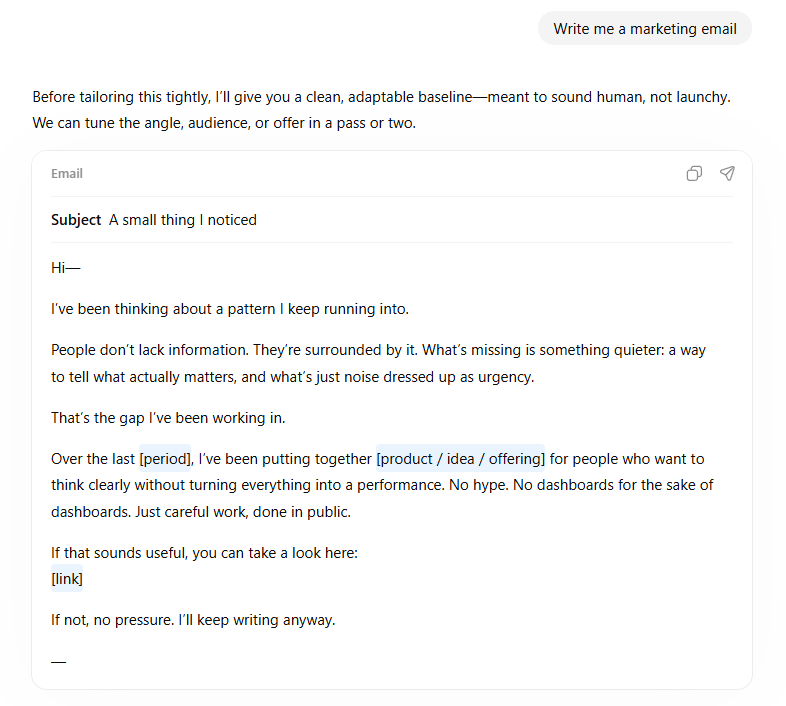
Bad prompt: “Write me a marketing email.”
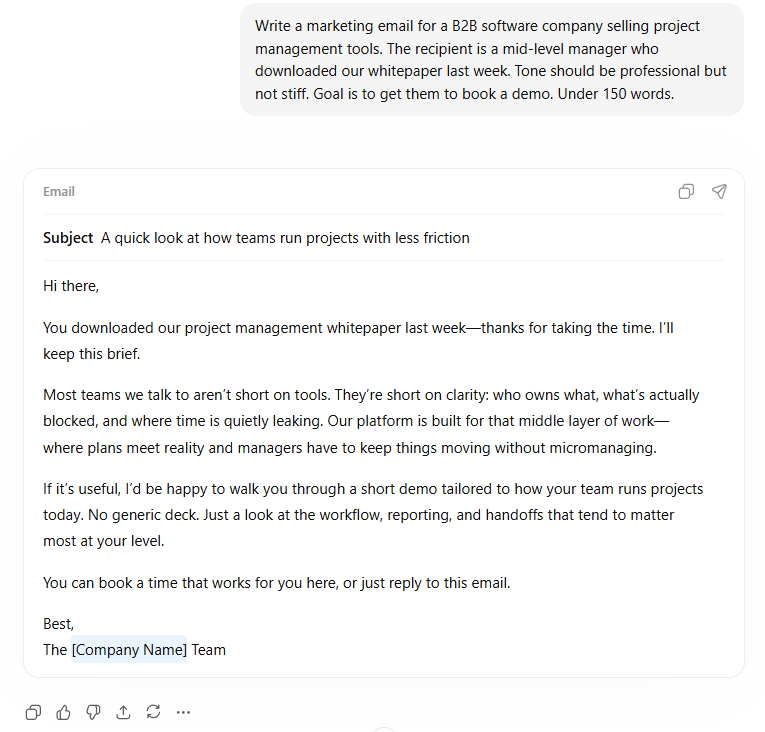
Better prompt: “Write a marketing email for a B2B software company selling project management tools. The recipient is a mid-level manager who downloaded our whitepaper last week. Tone should be professional but not stiff. Goal is to get them to book a demo. Under 150 words.”
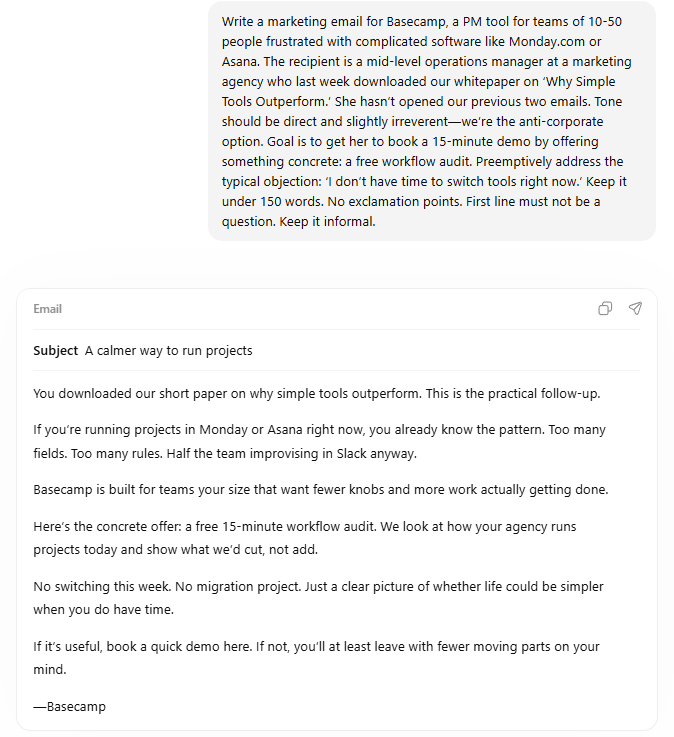
Even better prompt: “Write a marketing email for Basecamp, a PM tool for teams of 10-50 people frustrated with complicated software like Monday.com or Asana. The recipient is a mid-level operations manager at a marketing agency who last week downloaded our whitepaper on ‘Why Simple Tools Outperform.’ She hasn’t opened our previous two emails. Tone should be direct and slightly irreverent—we’re the anti-corporate option. Goal is to get her to book a 15-minute demo by offering something concrete: a free workflow audit. Preemptively address the typical objection: ‘I don’t have time to switch tools right now.’ Keep it under 150 words. No exclamation points. First line must not be a question. Keep it informal.”
The third prompt contains info the AI needs to give you something useful: names, goals, constraints, edge cases, preemptive counters, etc. Prompt engineering advice that’s valuable boils down to: include the context you’d give a competent human colleague. You already know how to do that! It’s the blank screen that creates a block in your mind: Imagine you’re chatting with a friend! Can you see now that you have no real need for courses or 100-item lists? They are a form of active procrastination.
The thing is, we get lazy when we think we have a magic crystal ball, and AI creates that impression. We assume it is inside our heads and can read our thoughts! It is not, it is outside like a work colleague would be. Getting this “laziness” under control is key to getting the most out of AI tools.
Exercise: Take a task you actually need to do this week. Write the prompt you’d naturally write, then spend five minutes adding context (no less than that, use a clock; this is key to battling laziness and active procrastination). Some ideas: who’s the audience, what’s the goal, what constraints exist, what tone is appropriate, and what’s the background, even how you feel. Compare the output with a zero-context prompt.
Hour 5-6: Build two workflows you will use
Again: quality over quantity. You need to use AI for real tasks and discover its quirks through experience. Remember the motto: Everything is partially chatgptable. Only practice will reveal when your judgment is superior. Pick two workflows from this list based on what’s relevant to your work (or make your own and save them). These are just examples that I’m familiar with or use personally:
The research accelerator: Use AI to summarize long documents, extract key points, or explain technical material. Upload a PDF or paste text and ask specific questions. Don’t ask “summarize this” but “what are the three main arguments in this paper and what evidence supports each?” or “what are the main criticisms of the arguments in this paper?” Then add something like “my background is X and Y, the topics are Z and T, etc.” Don’t be afraid to burn tokens on “deep research” mode; the quality of the output is unrivaled.
The draft generator: AI writes mediocre-but-quick first drafts; then you edit. This inverts the hard part (blank page) and the easy part (revision). (This, of course, doesn’t apply if you like writing.) The key, as always, is giving enough context upfront that the draft is worth editing rather than replacing. One option is to brainstorm your ideas into bullet points (this removes the friction of ordering them and making them readable) and use that as context.
The thought partner: Describe a problem you’re stuck on, professional or personal. Ask for alternative approaches, potential objections to your plan, or questions you should be asking. Ask for honesty over friendliness (Claude and Gemini are superior to ChatGPT on this). AI tools are often better at generating options than selecting among them; better at analysis than execution.
The multilevel explainer: When you don’t understand something, ask for explanations at different levels. “Explain like I’m a smart person who works on X, has a background on Y, and doesn’t know this field” works better than “Explain like I’m five” (which gets you condescension) or “Explain this topic to me” (which gets you jargon). Again, context is king with AI tools.
The format transformer: Turn meeting notes into action items. Turn bullet points into prose and vice versa. Turn a long document into a shorter one. These mechanical transformations are where AI saves the most time with the least risk; checking for correctness is trivial in most cases, especially if the content is yours.
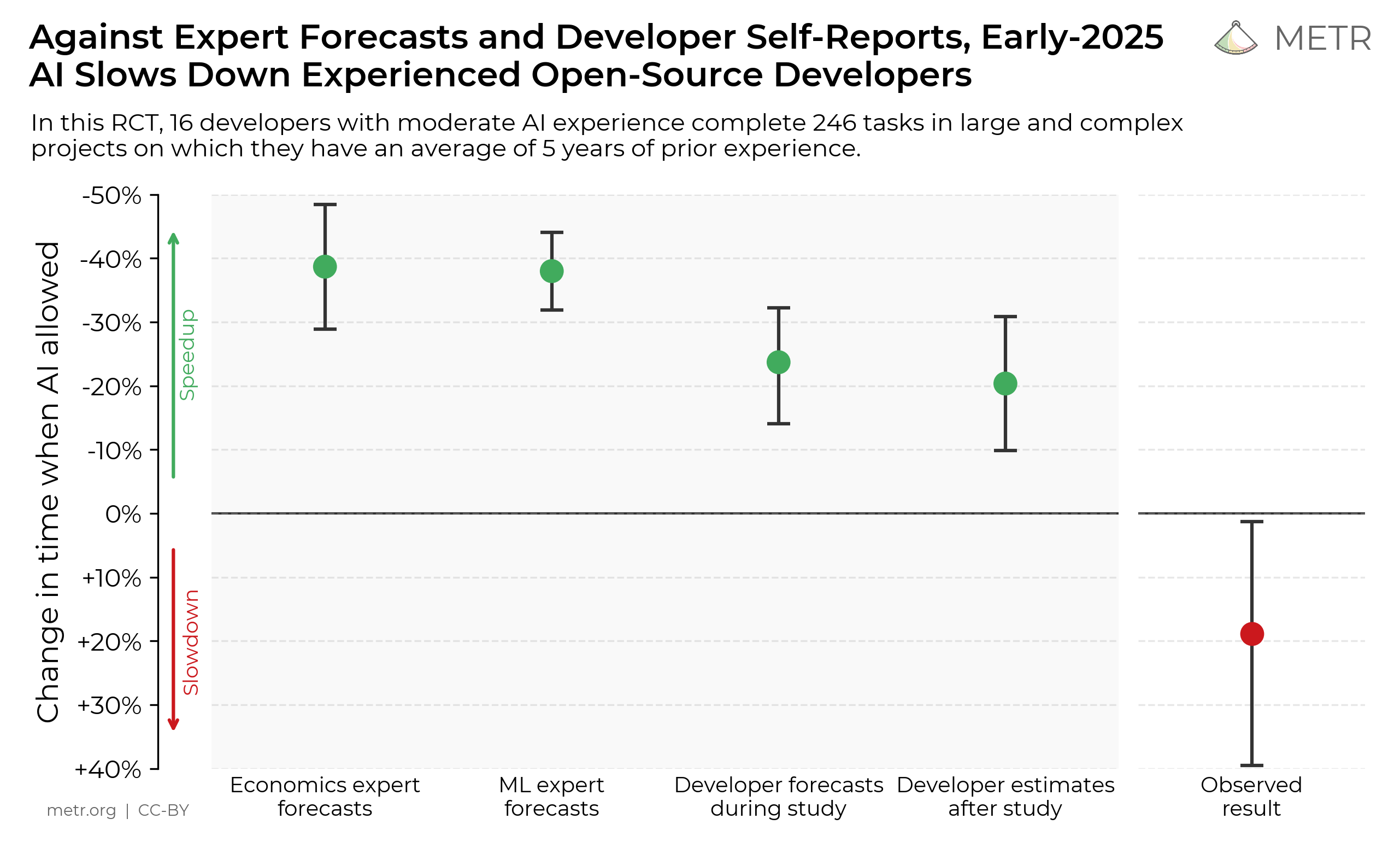
Exercise: Complete one real task with each of the three workflows you chose (for instance, I use 1, 3, and 4 daily). Note what works zero-shot, what requires intervention, and how much time it saves (measure it; we tend to overestimate our ability to self-report accurately).5 Don’t waste time in the friction of thinking whether AI can help you; create a workflow and jump into action.
Hour 7-8: Learn what not to do with AI tools
Time saved making mistakes is often worth more than time spent on trying to figure out what AI can do. Here are five basic things you shouldn’t do with AI tools (besides the things they’re bad at; some are outright dangerous).
Don’t trust AI for facts without verification. It will confidently cite papers and articles that don’t exist, quote statistics it invented, and describe events that never happened. If accuracy matters, verify independently. You can’t trust the tool’s own testimony on whether the citations are made-up or not; it will make up that it did not make them up. Tricky situation; trust me instead.
Don’t use it for anything critical that you can’t evaluate firsthand. If you don’t know enough about a topic to spot errors and the task is high stakes, unchecked AI assistance is dangerous rather than helpful. It’s a tool for accelerating work that you understand, not a substitute for understanding.
Don’t paste confidential info into AI tools you don’t own. Assume anything you input could be seen by others or used for training. Use enterprise versions with data agreements if you’re handling sensitive material or install the tools locally.
Don’t iterate forever. If after three-five attempts you haven’t made any progress, the problem is either your prompt (add more context) or the task (AI isn’t good at this particular thing). Start over.
Don’t fully anthropomorphize: remember that AI is an “alien” tool. In my opinion, it’s not that important if you think of it as capable of “thinking” or “feeling.” The problem is not that you attribute some human features to it, but that you attribute all of them.
What you should be able to do now
By the end of this day, you should be able to:
Write detailed prompts that produce useful first outputs
Iterate on outputs without starting over until you have to
Identify tasks where AI saves time versus wastes it
Catch obvious errors and hallucinations
Complete real work faster than without AI
The only things you need besides applying this tutorial are 1) consistent practice over time and 2) checking periodically whether the tools have improved or changed meaningfully, and which one is the best (every few months is more than enough). Unless you have access to an AI tool tailored to you, use one of the three big providers by default: Anthropic, Google, and OpenAI. They’re the best.
That’s the recipe. Now you cook.
Here’s a more technical way to put it: AI models (large language models) can parse novel problems from non-novel shapes by pattern-matching from the vast latent space they’ve encoded during pre-training, but they can’t think from first principles.
In 2023, when OpenAI released DALL-E 3, I claimed that prompt engineering wouldn’t last; I was thoroughly mistaken.
A secondary skill worth including here: If the output isn’t right, don’t start over. Say what’s wrong and ask for a revision. “This is too formal, make it quirkier,” or “The second paragraph is good, but the opening is generic” works better than re-prompting from scratch. But don’t overdo it. There’s value in knowing when to move on: if the chat is long and the context window saturated, starting over can be wise. Practice makes perfect.
Results from ChatGPT (GPT-5.2), in order (I dislike ChatGPT’s prose style even for something as mundane as a marketing email, but that’s for you to tweak; I recommend using Claude Opus 4.5 right now—it’s better):
Here’s the relevant chart from the METR study I quoted in this passage:
Yes, spot on. However, this guide misses some sequential tactics in prompt writing that I find are a game-changer. I call it context priming. When you use a sequence of prompts going from one aspect to a deeper aspect, rather than just trying to create a detailed initial prompt to the point of completeness. I heard names like progressive prompting, prompt chain, etc. In my experience, it is one of the most important aspects of interacting with LLM-based stuff.
This is a really good synopsis and I’m going to be keeping some of this in my back pocket going forward. A lot of your points are things I bring up all the time: AI is like a loyal assistant - I don’t trust it to send out a company wide email without review, but I sure do appreciate it drafting one for me.